You Own a Pool. Here’s How to Rent It Out Without Being There.
Private pool hire is one of the most straightforward revenue streams available to any pool owner — but most people running it are still doing the one thing that makes it feel like a second job: being available for every booking to hand over a key, give out an access code, or answer a phone call from someone who can’t find the gate.
Jason Hearse
Founder, Vale Swim Academy
It doesn’t have to work that way. With the right system, a pool booking made at 11pm delivers payment, instructions, photos, and access codes to the hirer automatically. You find out it happened when you check your bank account.
Here’s how to set it up.
The typical private pool hire setup
Most private pool owners manage bookings in one of three ways:
Phone and email enquiry — a customer contacts you, you check your diary, you reply with availability, they confirm, you send bank details, they transfer, you manually reconcile. Every booking is 4–6 touchpoints. You’re the bottleneck.
Wix or similar website builder — you set up a booking page, customers can book and pay, but Wix has no idea about your other pool commitments. No automatic clash detection. You’re still manually checking that each booking doesn’t conflict with something else.
Bookwhen or similar booking platform — better functionality, but a platform commission on every booking. And still no awareness of other events at your pool unless you manually block time out.
All three share the same fundamental problem: the booking tool doesn’t know what’s happening at your pool, and you do all the admin to compensate.
What a pool hire booking system should actually do
A proper private pool hire booking system should:
- Show live, accurate availability to customers without you having to check anything
- Let customers book and pay instantly — no back-and-forth
- Collect full card payment at the point of booking, into your account
- Block out time automatically when something else is happening at the pool
- Handle recurring regular hirers without you re-managing the booking each week
- Let you keep every penny, minus card processing fees
Most tools do one or two of these well. Very few do all of them.
The commission problem
Third-party booking platforms typically charge in one of two ways: a monthly fee plus a percentage of each booking, or a per-booking commission with no monthly fee.
Either way, you’re paying a cut of your revenue to a platform indefinitely.
For a pool generating £20,000/year in hire revenue at a 3% platform commission, that’s £600/year going to a platform. For £50,000/year, it’s £1,500.
ClassBase charges a flat monthly fee. No commission on bookings. The only payment processing cost is Stripe’s standard rate — 1.5% + 20p per transaction for UK cards. Everything else is yours.
The clash detection problem
If your pool is used for more than one purpose — private hire plus swim lessons, or private hire plus your own personal use, or private hire plus a regular club booking — keeping availability accurate is a constant manual job.
Every time something gets added to your schedule, every booking platform except ClassBase requires you to manually block the corresponding time. Get it wrong once and you have a double-booking.
ClassBase uses a single availability engine for everything that happens at your pool. Lesson sessions, existing hire bookings, manual blocks, maintenance periods — all of it is factored into what’s shown as available to new customers. Automatically.
If you run swim lessons from your pool, this is particularly valuable. The lesson schedule is live inside ClassBase, so the availability calendar your hire customers see already accounts for lesson times without you having to do anything.
The feature that makes it truly hands-off
Most pool hire systems still leave one problem unsolved: you have to be there, or at least available by phone, to handle key handover or give someone an access code.
ClassBase has a dedicated Hire Instructions section that eliminates this entirely. You configure it once, and every booking confirmation automatically delivers everything the hirer needs:
- General instructions — pool rules, safety information, parking details, what to bring, emergency contact numbers
- Photos — up to 10 images shown on the booking page and confirmation: parking map, site layout, pool photos, changing room, equipment available
- Access codes — gate PIN, key safe code, WiFi password, door entry codes. Delivered on the booking confirmation automatically the moment payment is taken
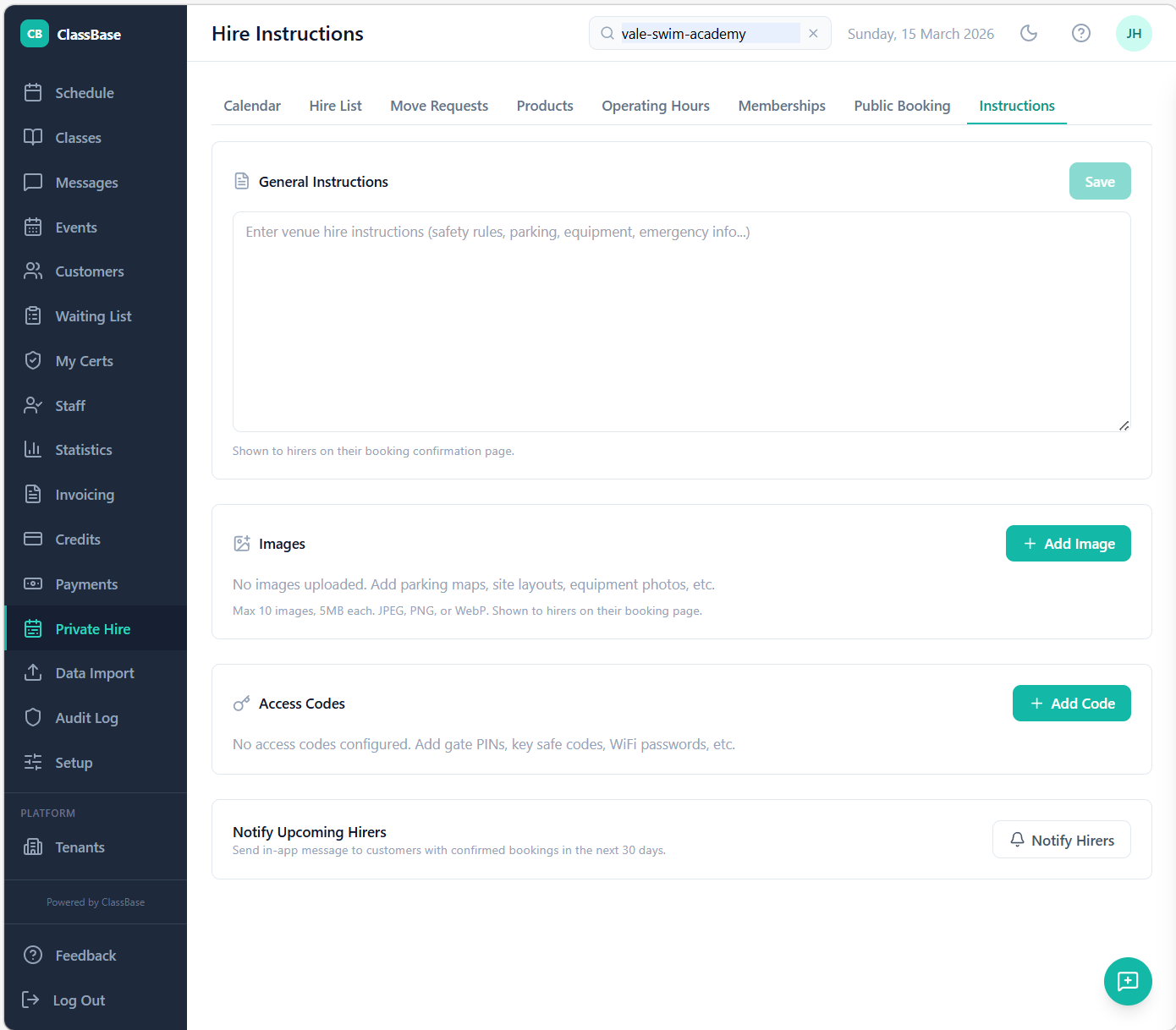
The ClassBase Hire Instructions page — access codes, photos, and pool rules delivered automatically on every booking confirmation.
The result: a booking made at 11pm on a Sunday for Saturday morning delivers payment confirmation, full instructions, photos, and access codes to the hirer without you doing anything. They arrive, they get in, they swim, they leave. You find out it happened when you check your Stripe dashboard.
At Vale Swim Academy, our pool operates as fully self-service hire for every non-lesson slot. We haven’t needed to be on-site for a hire booking since setting this up. That’s the operational reality the Instructions section makes possible.
How it works in practice
Setting up pool hire in ClassBase takes about an hour:
- Define your operating hours — set the standard hours your pool is available for hire each day of the week. Add any exceptions — days you’re not available, maintenance periods, holidays.
- Create your hire products — these are the packages you want to sell. Family swim for 60 minutes at £45. Pool party for 90 minutes at £80. Club training lane for 90 minutes at £55. You set the name, duration, capacity, and price. Multiple products, each with their own settings.
- Connect Stripe — takes about five minutes. Stripe handles card payment at the point of booking. Funds settle to your bank account within two business days.
- Share your booking page — ClassBase generates a public calendar page that shows your live availability. Share the link anywhere — your website, social media, WhatsApp, wherever your enquiries currently come from.
From that point, the booking flow is fully self-service. A customer visits the page, sees what’s available, picks a slot, pays by card, and receives a confirmation. You receive a notification. No phone calls, no bank transfer chasing, no manual reconciliation.
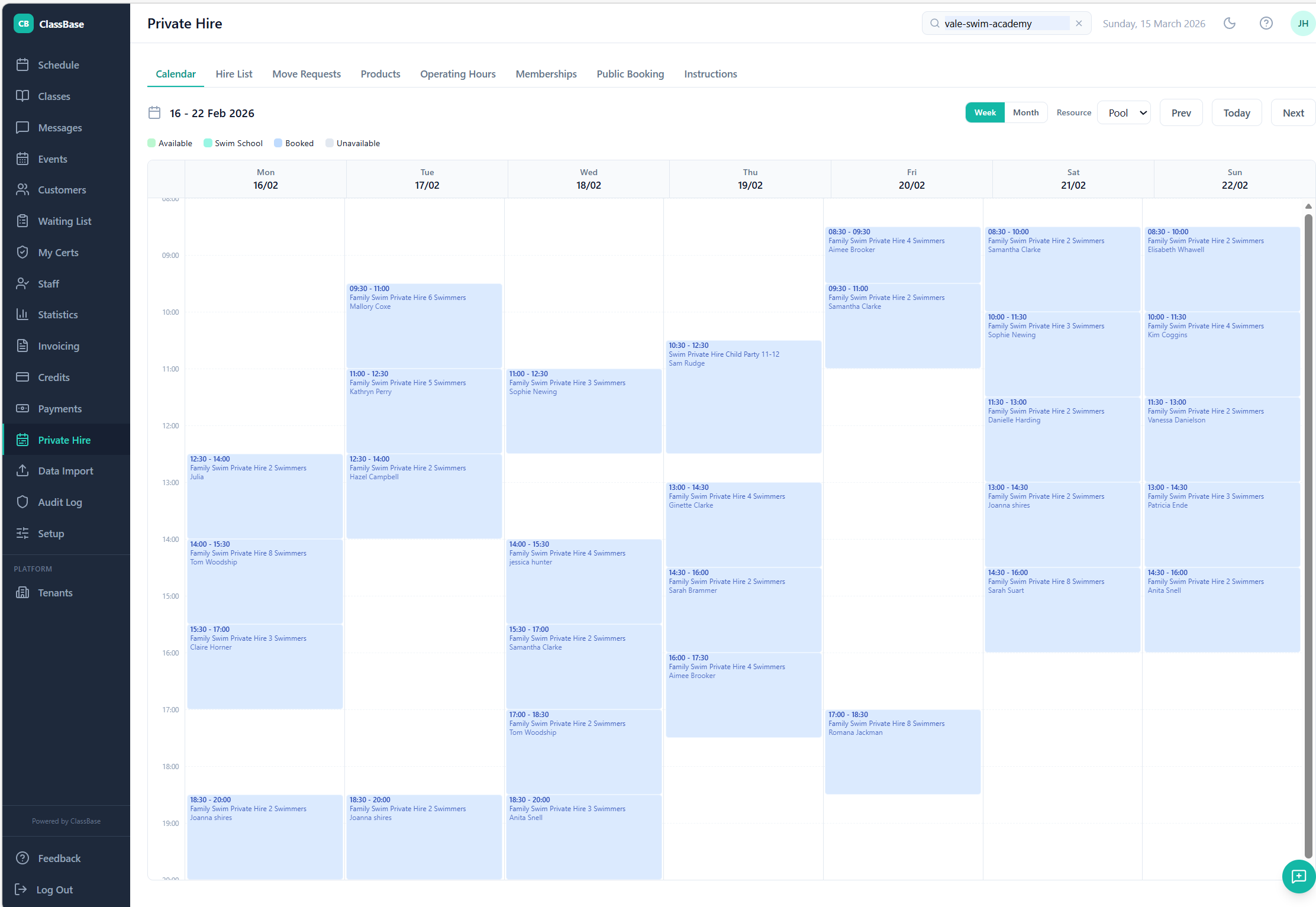
The ClassBase public booking calendar — customers browse live availability and book without calling you.
Recurring hirers
If you have regular hirers — a swimming club that trains every Tuesday evening, a school that books every Thursday morning, an aqua fitness instructor who needs Saturdays — ClassBase handles these as recurring booking blocks.
You set up the recurring booking once, define the period (weekly for 10 weeks, or the whole term), and ClassBase creates all the slots and processes payment. The hirer gets their regular slot confirmed in one go. You don’t touch it again until the period ends and you renew.
This is particularly valuable for school swimming club bookings, which are typically weekly and run for an entire academic term.
Hire memberships
If you want to offer regular hirers better rates or priority access, ClassBase supports hire membership tiers.
A paid hire membership gives the member access to discounted booking rates or the ability to book slots before they open to the public. You set the membership price and what it includes. ClassBase handles the sign-up, payment, and membership status tracking.
This works well for pools with more demand than availability — memberships give your best customers first access while still letting you fill remaining slots at standard rates.
Do you need the swim school features?
No. If you’re a private pool owner who wants a booking and payment system without any of the swim school management — no classes, no student records, no skill tracking — ClassBase works perfectly well used purely for hire management.
The swim school features are there if you want them. But they’re not required, and they don’t get in the way.
What it costs
ClassBase starts at £25/month. The Private Hire & Facility Booking add-on is £15/month. That’s £40/month total — £480/year — for a complete pool hire management system with no per-booking commission.
At £20,000/year in hire revenue, you’d need a platform commission of just 2.4% before ClassBase’s flat fee becomes cheaper. Most platforms charge more than that.